import React, { useState, useEffect, useRef, useContext, createContext } from "react";
import ReactDOM from "react-dom/client";
import {
  ArrowRight, ArrowLeft, Building2, Mail, User, Check, ChevronDown, MapPin,
  Fingerprint, Send, Waves, Users, Workflow,
  LayoutGrid, Calendar as CalendarIcon,
  Sprout, TrendingUp, Gem, Rocket, Flame,
} from "lucide-react";

// ============================================================================
// APPLE DESIGN LAYER — spring physics, press-on-pointer-down feedback,
// translucent floating material, reduced motion support.
// ============================================================================

function usePrefersReducedMotion() {
  const [reduced, setReduced] = useState(false);
  useEffect(() => {
    const mq = window.matchMedia("(prefers-reduced-motion: reduce)");
    setReduced(mq.matches);
    const handler = () => setReduced(mq.matches);
    mq.addEventListener("change", handler);
    return () => mq.removeEventListener("change", handler);
  }, []);
  return reduced;
}

function useSpring(target, { damping = 1, response = 0.35 } = {}) {
  const reducedMotion = usePrefersReducedMotion();
  const [value, setValue] = useState(target);
  const state = useRef({ value: target, velocity: 0 });
  const raf = useRef(null);
  useEffect(() => {
    if (reducedMotion) { state.current = { value: target, velocity: 0 }; setValue(target); return; }
    const omega = (2 * Math.PI) / Math.max(response, 0.05);
    const stiffness = omega * omega;
    const dampingCoeff = 2 * damping * omega;
    let last = performance.now();
    const tick = (now) => {
      const dt = Math.min((now - last) / 1000, 1 / 30);
      last = now;
      const s = state.current;
      const displacement = s.value - target;
      const accel = -stiffness * displacement - dampingCoeff * s.velocity;
      s.velocity += accel * dt;
      s.value += s.velocity * dt;
      const settled = Math.abs(s.value - target) < 0.01 && Math.abs(s.velocity) < 0.01;
      if (settled) { s.value = target; s.velocity = 0; setValue(target); return; }
      setValue(s.value);
      raf.current = requestAnimationFrame(tick);
    };
    raf.current = requestAnimationFrame(tick);
    return () => raf.current && cancelAnimationFrame(raf.current);
    // eslint-disable-next-line react-hooks/exhaustive-deps
  }, [target, damping, response, reducedMotion]);
  return value;
}

function usePressScale(pressedTo = 0.97) {
  const [pressed, setPressed] = useState(false);
  const scale = useSpring(pressed ? pressedTo : 1, { damping: 1, response: 0.15 });
  const handlers = {
    onPointerDown: () => setPressed(true),
    onPointerUp: () => setPressed(false),
    onPointerLeave: () => setPressed(false),
    onPointerCancel: () => setPressed(false),
  };
  return [scale, handlers];
}

function ExpandingPanel({ open, children }) {
  const ref = useRef(null);
  const [measured, setMeasured] = useState(0);
  useEffect(() => { if (ref.current) setMeasured(ref.current.scrollHeight); });
  const height = useSpring(open ? measured : 0, { damping: 1, response: 0.4 });
  const opacity = useSpring(open ? 1 : 0, { damping: 1, response: 0.3 });
  return (
    <div style={{ height: Math.max(height, 0), opacity, overflow: "hidden" }}>
      <div ref={ref}>{children}</div>
    </div>
  );
}

// ---- Design tokens ----------------------------------------------------
const C = {
  black: "#0A0A0A", blue: "#2E7DFF", purple: "#7C4DFF", gold: "#EFC775",
  red: "#E15646", amber: "#E8A33D", green: "#2FA84F",
  bg: "#F5F5F7", surface: "#FFFFFF", border: "#E9E7E3",
  t1: "#0A0A0A", t2: "#6B6B6B", t3: "#9B9B9B",
};
const TRAFFIC = [C.red, C.amber, C.green];
const sans = '"Inter", -apple-system, BlinkMacSystemFont, "Segoe UI", sans-serif';
const CTA_URL = "https://www.cloudcut.co/contact";
const HOME_URL = "https://www.cloudcut.co";

// ============================================================================
// CONTENT — structure (ids, icons, question logic) stays in code. Everything
// a person would call "wording" lives in DEFAULT_CONTENT below. {church} is
// replaced with the real church name wherever it appears.
// ============================================================================

const CATEGORY_META = [
  { id: "brand", Icon: Fingerprint },
  { id: "social", Icon: Send },
  { id: "longform", Icon: Waves },
  { id: "inperson", Icon: Users },
  { id: "team", Icon: Workflow },
];

const ARCHETYPE_META = [
  { min: 0, Icon: Sprout },
  { min: 21, Icon: TrendingUp },
  { min: 41, Icon: Gem },
  { min: 61, Icon: Rocket },
  { min: 81, Icon: Flame },
];

const DEFAULT_QUESTIONS = [
  { cat: 0, q: "If we asked three people on your team to describe your church in one sentence, would they say the same thing?", opts: ["Honestly, no idea", "Similar themes, different words", "Yes, absolutely aligned"] },
  { cat: 0, q: "Does your church have a clear answer to what makes you different from the church down the road?", opts: ["Not really", "We know it, we just don't say it", "Yes, and we say it often"] },
  { cat: 1, q: "How often does your church post on social media?", opts: ["1 or fewer posts a week", "2 to 3 posts a week", "Daily or almost daily"] },
  { cat: 1, q: "Are you posting from a plan, or figuring it out week to week?", opts: ["Whoever remembers that week", "We plan loosely, week by week", "We batch content in advance from a calendar"] },
  { cat: 2, q: "Are you building a library of your Sunday messages online?", opts: ["Livestream only, or not uploaded", "Uploaded, but we're not sure how they're doing", "Yes, full video every week, easy to find"] },
  { cat: 2, q: "How much does one message get turned into other content, like clips, articles, or emails?", opts: ["Not really repurposed", "Occasionally, a clip here and there", "Fully repurposed into clips, articles, and emails"] },
  { cat: 3, q: "During announcements, how clear is what you're asking people to do?", opts: ["Whatever's on the run sheet that week", "A handful of things", "One obvious next step"] },
  { cat: 3, q: "Do you send anything between Sundays, like email or text, to keep people connected?", opts: ["Basically nothing", "Occasionally", "Yes, regularly"] },
  { cat: 4, q: "Is there one named person responsible for your church's comms?", opts: ["No, it's whoever has time", "Sort of, it's informal", "Yes, clearly"] },
  { cat: 4, q: "If that person left tomorrow, could someone else pick it up?", opts: ["No, it would fall apart", "Maybe, with some scrambling", "Yes, it's documented"] },
];

const PLATFORMS = ["Instagram", "YouTube", "Email", "TikTok", "Website", "Church App", "Other"];
const CHURCH_SIZES = ["Under 50", "50–150", "150–300", "300–500", "500+"];

const DEFAULT_CONTENT = {
  screens: {
    landingEyebrow: "Church Communications Audit",
    landingHeadline: "Are your church communications cutting through the noise?",
    landingSubhead: "The Church Communications Audit has been designed to show you your blind spots and provide you with instant, actionable steps on how to deepen your communications impact.",
    landingTime: "Takes less than 3 minutes",
    landingButton: "Start the audit",
    intakeHeading: "Let's start with the basics.",
    intakeSubhead: "Two quick things we need:",
    prebriefIntro: "We're about to look at {church} across five key areas.",
    prebriefOutro: "Give your first reaction to each question. Don't overthink it.",
    prebriefButton: "Let's go",
    platformsHeading: "Which platforms does your church use?",
    captureButton: "Audit My Church",
    loadingLines: ["Reading your answers...", "Comparing against churches we work with...", "Building your report..."],
    scoreLabel: "Church Communications Audit Results | {church}",
    opportunityLabel: "Biggest opportunity",
    opportunityTemplate: "{church}'s {category} is what's holding you back most right now.",
    whereYouAreLabel: "Your Communications Level",
    ctaLabel: "Recommended tool for {church}",
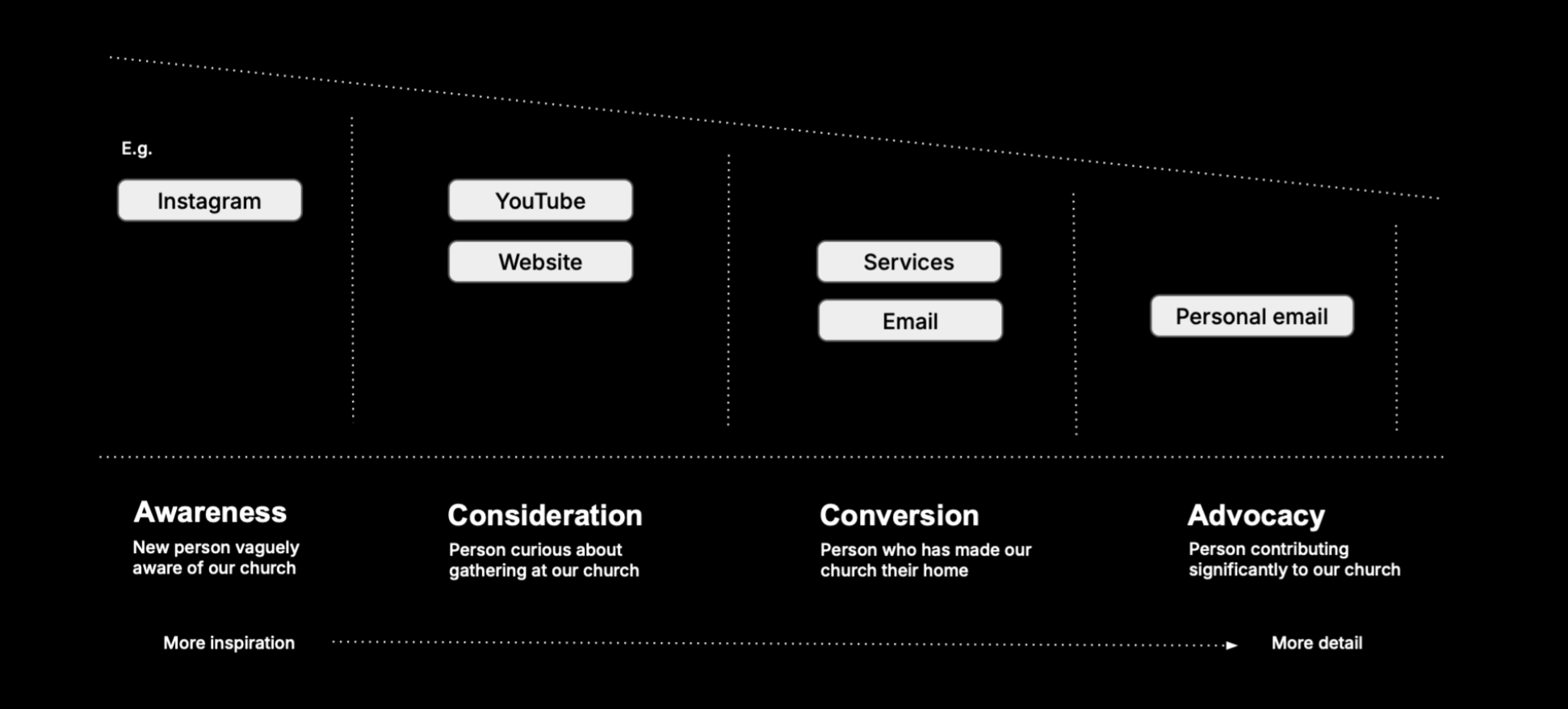
    ctaHeading: "The CloudCut Communications Flight Plan",
    ctaBody: "A five-part framework for turning scattered comms into one clear system, built from everything above.",
    ctaButton: "See more",
    footerNote: "Your full results have also been sent to your email.",
  },
  categories: [
    {
      label: "Brand",
      why: "A clear brand is what makes your church memorable and easy to trust. It's the foundation everything else in your comms stands on.",
      ingredients: ["Foundation. What makes your church unique", "Messaging. The words your whole team will use", "Expression. How you look and feel.", "Content. The templates you use that keep you consistent."],
      recs: {
        low: { line: "A church that can't say plainly what makes it different will always struggle to cut through in their communications.", win: "Get three people from your leadership together and have a real conversation: what makes our church distinct from every other church? You lead it.", next: "Turn that language into a Messaging Handbook so it survives new hires and volunteer turnover." },
        medium: { line: "Some of your team knows what makes your church different. It hasn't reached everyone yet.", win: "Write your one sentence down and put it somewhere your team sees every week.", next: "Turn that language into a Messaging Handbook so it survives new hires and volunteer turnover." },
        high: { line: "Your team describes your church the same way, in their own words. That's rare, and it's working.", win: "Build a messaging framework with graphic templates so everybody stays on brand.", next: "Turn that language into a Messaging Handbook so it survives new hires and volunteer turnover." },
      },
    },
    {
      label: "Social Media",
      why: "Social media is often the first place someone encounters your church. Showing up clearly and consistently there builds trust before anyone walks through your doors.",
      ingredients: ["Consistency. Build a rhythm that holds even in a busy week.", "Batching. Make content made ahead of time, not under pressure.", "Clear next steps. Every post should send someone somewhere.", "Add variety. Teaching, showing, proving, and connecting."],
      recs: {
        low: { line: "Right now, posting depends on someone remembering to do it.", win: "Pick one day each week and post then, every week. Start with Reels.", next: "Build a content calendar and batch a month of posts at a time." },
        medium: { line: "There's a posting rhythm forming, but it won't hold up in a busy week.", win: "Start batching content and set up a simple workflow for consistent Reels.", next: "Build a content calendar and batch a month of posts at a time." },
        high: { line: "Your posting is consistent. The next step is giving every post somewhere to send people.", win: "Check your last five posts for a clear next step on each one.", next: "Build a content calendar and batch a month of posts at a time." },
      },
    },
    {
      label: "Long-Form Content",
      why: "A lot of work goes into your Sunday message. Repurposing it well means that work reaches more people, more times.",
      ingredients: ["Record it well. Clean audio and video helps people engage.", "Publish it properly. Titled, findable, easy to return to.", "Repurpose it. Create clips, quotes, and a written version.", "Send it back out. An email, social, and the next teaching."],
      recs: {
        low: { line: "A full sermon gets prepared every week, and it disappears after Sunday.", win: "Upload your message every week, titled and trimmed properly.", next: "Build a weekly process. One sermon becomes a clip, a quote graphic, and a reminder email." },
        medium: { line: "Your messages are online, but they're not being turned into much else.", win: "Pull one 60 second clip from last week's message.", next: "Build a weekly process. One sermon becomes a clip, a quote graphic, and a reminder email." },
        high: { line: "You're repurposing your messages well. Now it's time to keep it running without you.", win: "Grow your subscriber base and send one repurposed clip or quote by email each week.", next: "Build a weekly process. One sermon becomes a clip, a quote graphic, and a reminder email." },
      },
    },
    {
      label: "In-Person & Direct Comms",
      why: "Sunday is where your church earns the most trust with your invested members each week. Clear simple next steps is what turns that into action.",
      ingredients: ["Topic - choose a single clear topic for each Sunday.", "Next Step - choose a single action that's easy to take.", "Reinforce -  comms between Sundays to recap your next step.", "Feedback loop - know whether people actually took the step."],
      recs: {
        low: { line: "People leave on a Sunday without a clear sense of what to do next.", win: "Pick one thing you want people to do this Sunday. ", next: "Write your Communications Flight Plan: one clear step per stage of your church's journey." },
        medium: { line: "There's a next step, but it's competing with a few others, and without reinforcement.", win: "Send one short email or text this week reinforcing that one thing.", next: "Write your Communications Flight Plan: one clear step per stage of your church's journey." },
        high: { line: "Your in-person clarity is strong. Most churches miss this part.", win: "Check your last three Sundays. How many events did you announce in a single service?", next: "Write your Communications Flight Plan: one clear step per stage of your church's journey." },
      },
    },
    {
      label: "Team & Systems",
      why: "Someone needs to own your church's comms and decide what gets said and when. That person is what makes everything else in this audit actually work.",
      ingredients: ["A named owner. One person clearly responsible", "A documented process. Written down in a comms handbook.", "Templates. The whole team can now stay on-brand without you.", "A backup plan. Comes into action the week your PIC is away or leaves."],
      recs: {
        low: { line: "No one is clearly steering your church's comms right now.", win: "Decide this week who's responsible.", next: "Write down what happens weekly and who does it, on one page." },
        medium: { line: "Someone's carrying your comms, but it's mostly in their head.", win: "Write a one page doc of what happens weekly, and who does it.", next: "Make sure someone new could pick up that doc and run with it in a week. Consider the CloudCut Communications Flight Plan to keep it running long term." },
        high: { line: "You've got a named owner and it's documented. That's what most churches never build.", win: "Check your documentation is still current, not written once and forgotten.", next: "Consider the CloudCut Communications Flight Plan to keep it running long term." },
      },
    },
  ],
  archetypes: [
    { name: "The Blank Canvas", description: "You have real potential, but right now {church}'s comms are inconsistent and reactive. Your message and language likely changes depending on who's writing the comms. You don't really have a system holding things together yet." },
    { name: "The Scattered Starter", description: "You're on the right track, but {church} is stretched thin. Whoever is carrying comms is probably doing it on top of other responsibilities. With no real system underneath, your progress happens in bursts and then stalls." },
    { name: "The Hidden Achiever", description: "You have real substance at {church}. But, it's easy to miss that from outside the building. You are probably invisible to a large group of people in your community who might want to call your church their home." },
    { name: "The Stretched Builder", description: "You have most of the ingredients ready for a strong comms plan at {church}. What's missing is joining all your habits and rhythms into one unified system that runs without you having to hold it together." },
    { name: "The Momentum Builder", description: "Clear brand, consistent output. Someone is clearly in charge and doing a great job. You have a system. What's left is sharpening your strategy by measuring your impact, and doubling down on what's already working well." },
  ],
};

function fill(str, church) {
  const name = church || "your church";
  return (str || "").replaceAll("{church}", name);
}

function tierFor(sum2) {
  if (sum2 <= 1) return "low";
  if (sum2 <= 2) return "medium";
  return "high";
}

// ---- content loader — fetches the editable wording from /api/content
// (backed by Vercel Blob, edited via /editor.html) and merges it over the
// DEFAULT_CONTENT/DEFAULT_QUESTIONS shipped in code, key by key, so a
// partial or malformed save can never blank out a field on the live site.
function deepMergeContent(base, override) {
  if (Array.isArray(base)) {
    return base.map((item, i) => (override && override[i] !== undefined ? deepMergeContent(item, override[i]) : item));
  }
  if (base && typeof base === "object") {
    const result = { ...base };
    if (override && typeof override === "object") {
      for (const k of Object.keys(base)) {
        if (override[k] !== undefined) result[k] = deepMergeContent(base[k], override[k]);
      }
    }
    return result;
  }
  return typeof override === "string" && override.length > 0 ? override : base;
}

// ---- Content context — shared by preview so both read the same state.
const ContentContext = createContext(null);
function useAppContent() { return useContext(ContentContext); }

// ---- Shared UI ----------------------------------------------------------

function Shell({ children, wide }) {
  return (
    <div style={{ minHeight: "100vh", background: C.bg, fontFamily: sans, color: C.t1, display: "flex", alignItems: "center", justifyContent: "center", padding: "24px", position: "relative" }}>
      <div style={{ width: "100%", maxWidth: wide ? 640 : 560 }}>{children}</div>
    </div>
  );
}

function Card({ children, style }) {
  return <div style={{ background: C.surface, borderRadius: 24, border: `1px solid ${C.border}`, boxShadow: "0 12px 34px rgba(10,10,10,0.06)", padding: "40px 36px", ...style }}>{children}</div>;
}

function PrimaryButton({ children, onClick, disabled, style }) {
  const [scale, pressHandlers] = usePressScale(0.97);
  return (
    <button onClick={onClick} disabled={disabled} {...pressHandlers}
      style={{ width: "100%", background: disabled ? "#D6D3CD" : C.blue, color: "#fff", border: "none", borderRadius: 999, padding: "17px 24px", fontSize: 15.5, fontWeight: 700, display: "flex", alignItems: "center", justifyContent: "center", gap: 8, cursor: disabled ? "not-allowed" : "pointer", fontFamily: sans, transform: `scale(${scale})`, touchAction: "manipulation", ...style }}>
      {children}
    </button>
  );
}

function PressableOption({ active, onClick, children, style, activeStyle }) {
  const [scale, pressHandlers] = usePressScale(0.98);
  return (
    <button onClick={onClick} {...pressHandlers}
      style={{ transform: `scale(${scale})`, touchAction: "manipulation", cursor: "pointer", fontFamily: sans, ...style, ...(active ? activeStyle : {}) }}>
      {children}
    </button>
  );
}

function PressableCard({ onClick, children, style }) {
  const [scale, pressHandlers] = usePressScale(0.99);
  return (
    <div role="button" tabIndex={0} onClick={onClick} onKeyDown={(e) => { if (e.key === "Enter" || e.key === " ") onClick(); }} {...pressHandlers}
      style={{ transform: `scale(${scale})`, touchAction: "manipulation", cursor: "pointer", ...style }}>
      {children}
    </div>
  );
}

function BackButton({ onClick }) {
  const [scale, pressHandlers] = usePressScale(0.96);
  return (
    <button onClick={onClick} {...pressHandlers}
      style={{ background: "none", border: "none", padding: 0, marginBottom: 18, display: "inline-flex", alignItems: "center", gap: 5, color: C.t2, fontSize: 13.5, fontWeight: 600, cursor: "pointer", fontFamily: sans, transform: `scale(${scale})`, touchAction: "manipulation" }}>
      <ArrowLeft size={15} /> Back
    </button>
  );
}

function ProgressTape({ step, total }) {
  return (
    <div style={{ marginBottom: 28 }}>
      <div style={{ marginBottom: 10 }}><span style={{ fontSize: 12.5, fontWeight: 700, color: C.t2 }}>Question {step + 1} of {total}</span></div>
      <div style={{ display: "flex", gap: 4, height: 4 }}>
        {Array.from({ length: total }).map((_, i) => (
          <div key={i} style={{ flex: 1, borderRadius: 999, background: i <= step ? C.gold : "#E5E2DC", transition: "background 0.25s ease" }} />
        ))}
      </div>
    </div>
  );
}

const fieldLabel = { display: "block", fontSize: 12, fontWeight: 700, color: C.t2, marginBottom: 8 };
const inputStyle = { width: "100%", padding: "14px 16px 14px 42px", borderRadius: 16, border: `1.5px solid ${C.border}`, fontSize: 16, fontFamily: sans, outline: "none", boxSizing: "border-box", background: C.bg };
const pillBase = { padding: "11px 18px", borderRadius: 999, border: `1.5px solid ${C.border}`, fontSize: 13.5, fontWeight: 600, background: "#fff", color: C.t1 };
const smallLabel = { fontSize: 11.5, fontWeight: 700, color: C.t3, marginBottom: 8 };
const CITIES = [
  "London, England", "Birmingham, England", "Manchester, England", "Leeds, England", "Liverpool, England",
  "Sheffield, England", "Bristol, England", "Newcastle upon Tyne, England", "Nottingham, England", "Leicester, England",
  "Coventry, England", "Bradford, England", "Stoke-on-Trent, England", "Wolverhampton, England", "Plymouth, England",
  "Southampton, England", "Reading, England", "Derby, England", "Preston, England", "Milton Keynes, England",
  "Northampton, England", "Norwich, England", "Luton, England", "Portsmouth, England", "York, England",
  "Peterborough, England", "Cambridge, England", "Oxford, England", "Exeter, England", "Ipswich, England",
  "Middlesbrough, England", "Sunderland, England", "Blackpool, England", "Bolton, England", "Stockport, England",
  "Brighton, England", "Hove, England", "Bournemouth, England", "Poole, England", "Southend-on-Sea, England",
  "Colchester, England", "Gloucester, England", "Chelmsford, England", "Basildon, England", "Warrington, England",
  "Slough, England", "Swindon, England", "Huddersfield, England", "Rotherham, England", "Wakefield, England",
  "Doncaster, England", "Barnsley, England", "Blackburn, England", "Telford, England", "Cheltenham, England",
  "Worcester, England", "Hereford, England", "Lincoln, England", "Carlisle, England", "Chester, England",
  "Salisbury, England", "Bath, England", "Canterbury, England", "Winchester, England", "Durham, England",
  "Lancaster, England", "St Albans, England", "Watford, England", "Guildford, England", "Maidstone, England",
  "Crawley, England", "Woking, England", "Basingstoke, England", "Eastbourne, England", "Hastings, England",
  "Worthing, England", "Torquay, England",
  "Glasgow, Scotland", "Edinburgh, Scotland", "Aberdeen, Scotland", "Dundee, Scotland", "Inverness, Scotland",
  "Stirling, Scotland", "Perth, Scotland", "Paisley, Scotland", "East Kilbride, Scotland", "Livingston, Scotland",
  "Falkirk, Scotland", "Ayr, Scotland",
  "Cardiff, Wales", "Swansea, Wales", "Newport, Wales", "Wrexham, Wales", "Bangor, Wales", "St Davids, Wales", "Aberystwyth, Wales",
  "Belfast, Northern Ireland", "Derry, Northern Ireland", "Lisburn, Northern Ireland", "Newry, Northern Ireland",
  "Armagh, Northern Ireland", "Bangor, Northern Ireland",
];

// ---- Preview screens --------------------------------------------------

function Landing({ firstName, setFirstName, email, setEmail, onStart }) {
  const { content } = useAppContent();
  const s = content.screens;
  const canGo = firstName.trim().length > 0 && /\S+@\S+\.\S+/.test(email);
  return (
    <Shell>
      <div style={{ textAlign: "center", marginBottom: 28 }}>
        <div style={{ fontSize: 13, fontWeight: 700, color: C.blue, marginBottom: 18 }}>{s.landingEyebrow}</div>
        <h1 style={{ fontSize: "clamp(1.9rem, 6vw, 2.35rem)", lineHeight: 1.1, fontWeight: 800, letterSpacing: "-0.02em", margin: "0 0 16px" }}>{s.landingHeadline}</h1>
        <p style={{ fontSize: 16, color: C.t2, lineHeight: 1.65, margin: 0 }}>{s.landingSubhead}</p>
      </div>
      <Card style={{ textAlign: "center" }}>
        <div style={{ fontSize: 13, fontWeight: 600, color: C.t3, marginBottom: 20 }}>{s.landingTime}</div>
        <div style={{ position: "relative", marginBottom: 14, textAlign: "left" }}>
          <User size={16} color={C.t3} style={{ position: "absolute", left: 16, top: 16 }} />
          <input value={firstName} onChange={(e) => setFirstName(e.target.value)} placeholder="First name" style={inputStyle} />
        </div>
        <div style={{ position: "relative", marginBottom: 24, textAlign: "left" }}>
          <Mail size={16} color={C.t3} style={{ position: "absolute", left: 16, top: 16 }} />
          <input value={email} onChange={(e) => setEmail(e.target.value)} placeholder="you@yourchurch.org" style={inputStyle} />
        </div>
        <PrimaryButton onClick={onStart} disabled={!canGo}>{s.landingButton} <ArrowRight size={16} /></PrimaryButton>
      </Card>
    </Shell>
  );
}

function IntakeStep1({ church, setChurch, city, setCity, onNext }) {
  const { content } = useAppContent();
  const s = content.screens;
  const [open, setOpen] = useState(false);
  const matches = CITIES.filter((c) => c.toLowerCase().startsWith(city.toLowerCase())).slice(0, 5);
  const canGo = church.trim().length > 0 && city.trim().length > 0;
  return (
    <Shell>
      <Card>
        <h2 style={{ fontSize: 23, fontWeight: 800, letterSpacing: "-0.01em", lineHeight: 1.2, margin: "0 0 6px" }}>{s.intakeHeading}</h2>
        <p style={{ color: C.t2, fontSize: 14, margin: "0 0 28px" }}>{s.intakeSubhead}</p>
        <div style={{ position: "relative", marginBottom: 14 }}>
          <Building2 size={16} color={C.t3} style={{ position: "absolute", left: 16, top: 16 }} />
          <input value={church} onChange={(e) => setChurch(e.target.value)} placeholder="Church name" style={inputStyle} />
        </div>
        <div style={{ position: "relative" }}>
          <MapPin size={16} color={C.t3} style={{ position: "absolute", left: 16, top: 16 }} />
          <input value={city} onChange={(e) => { setCity(e.target.value); setOpen(true); }} onFocus={() => setOpen(true)} placeholder="Nearest city" style={inputStyle} />
          {open && city && matches.length > 0 && (
            <div style={{ position: "absolute", top: "calc(100% + 6px)", left: 0, right: 0, background: "rgba(255,255,255,0.75)", backdropFilter: "blur(16px) saturate(180%)", WebkitBackdropFilter: "blur(16px) saturate(180%)", border: "1px solid rgba(255,255,255,0.6)", borderRadius: 16, boxShadow: "0 8px 24px rgba(10,10,10,0.12)", zIndex: 10, overflow: "hidden" }}>
              {matches.map((m) => (
                <div key={m} onClick={() => { setCity(m); setOpen(false); }} style={{ padding: "11px 16px", fontSize: 14, fontWeight: 500, cursor: "pointer" }}
                  onMouseEnter={(e) => (e.currentTarget.style.background = "rgba(10,10,10,0.04)")} onMouseLeave={(e) => (e.currentTarget.style.background = "transparent")}>{m}</div>
              ))}
            </div>
          )}
        </div>
        <div style={{ marginTop: 28 }}><PrimaryButton onClick={onNext} disabled={!canGo}>Continue <ArrowRight size={16} /></PrimaryButton></div>
      </Card>
    </Shell>
  );
}

function PreBriefScreen({ church, onStart, onBack }) {
  const { content } = useAppContent();
  const s = content.screens;
  return (
    <Shell>
      <Card>
        <BackButton onClick={onBack} />
        <h2 style={{ fontSize: 22, fontWeight: 800, letterSpacing: "-0.01em", lineHeight: 1.3, margin: "0 0 18px" }}>{fill(s.prebriefIntro, church)}</h2>
        <div style={{ display: "flex", flexDirection: "column", gap: 10, marginBottom: 22 }}>
          {content.categories.map((c, i) => {
            const CatIcon = CATEGORY_META[i].Icon;
            return (
              <div key={i} style={{ display: "flex", alignItems: "center", gap: 12, padding: "10px 4px" }}>
                <div style={{ width: 30, height: 30, borderRadius: 9, background: C.bg, display: "flex", alignItems: "center", justifyContent: "center", flexShrink: 0 }}><CatIcon size={15} color={C.black} /></div>
                <span style={{ fontSize: 14.5, fontWeight: 600, color: C.t1 }}>{c.label}</span>
              </div>
            );
          })}
        </div>
        <p style={{ color: C.t2, fontSize: 14, lineHeight: 1.6, margin: "0 0 26px" }}>{fill(s.prebriefOutro, church)}</p>
        <PrimaryButton onClick={onStart}>{s.prebriefButton} <ArrowRight size={16} /></PrimaryButton>
      </Card>
    </Shell>
  );
}

function QuestionScreen({ index, total, question, categoryLabel, categoryIcon: Icon, existingAnswer, onAnswer, onBack }) {
  const [picked, setPicked] = useState(existingAnswer ?? null);
  useEffect(() => { setPicked(existingAnswer ?? null); }, [index, existingAnswer]);
  const handlePick = (i) => { setPicked(i); setTimeout(() => onAnswer(i), 220); };
  return (
    <Shell>
      <Card>
        <BackButton onClick={onBack} />
        <ProgressTape step={index} total={total} />
        <div style={{ display: "flex", alignItems: "center", gap: 8, marginBottom: 12 }}>
          <Icon size={15} color={C.blue} />
          <span style={{ fontSize: 12.5, fontWeight: 700, color: C.blue }}>{categoryLabel}</span>
        </div>
        <h2 style={{ fontSize: 21, fontWeight: 700, lineHeight: 1.35, letterSpacing: "-0.005em", margin: "0 0 26px" }}>{question.q}</h2>
        <div style={{ display: "flex", flexDirection: "column", gap: 10 }}>
          {question.opts.map((opt, i) => {
            const active = picked === i;
            return (
              <PressableOption key={i} active={active} onClick={() => handlePick(i)}
                style={{ textAlign: "left", padding: "16px 20px", borderRadius: 18, border: `1.5px solid ${C.border}`, background: "#fff", color: C.t1, fontSize: 15, fontWeight: 500, display: "flex", alignItems: "center", justifyContent: "space-between" }}
                activeStyle={{ border: `1.5px solid ${C.black}`, background: C.black, color: "#fff" }}>
                <span style={{ display: "flex", alignItems: "center", gap: 12 }}>
                  <span style={{ width: 9, height: 9, borderRadius: "50%", background: TRAFFIC[i], flexShrink: 0 }} />
                  {opt}
                </span>
                {active && <Check size={16} />}
              </PressableOption>
            );
          })}
        </div>
      </Card>
    </Shell>
  );
}

function PlatformsScreen({ selected, setSelected, size, setSize, onSubmit, onBack }) {
  const { content } = useAppContent();
  const s = content.screens;
  const toggle = (p) => setSelected((prev) => prev.includes(p) ? prev.filter((x) => x !== p) : [...prev, p]);
  return (
    <Shell>
      <Card>
        <BackButton onClick={onBack} />
        <div style={{ display: "flex", alignItems: "center", gap: 8, marginBottom: 12 }}>
          <LayoutGrid size={15} color={C.blue} />
          <span style={{ fontSize: 12.5, fontWeight: 700, color: C.blue }}>Last Question</span>
        </div>
        <h2 style={{ fontSize: 21, fontWeight: 700, lineHeight: 1.35, letterSpacing: "-0.005em", margin: "0 0 22px" }}>{s.platformsHeading}</h2>
        <div style={{ display: "flex", flexWrap: "wrap", gap: 10, marginBottom: 28 }}>
          {PLATFORMS.map((p) => {
            const active = selected.includes(p);
            return (
              <PressableOption key={p} active={active} onClick={() => toggle(p)} style={pillBase} activeStyle={{ background: C.black, color: "#fff", borderColor: C.black }}>{p}</PressableOption>
            );
          })}
        </div>
        <label style={fieldLabel}>Approximate church size (optional)</label>
        <div style={{ display: "flex", flexWrap: "wrap", gap: 8, marginBottom: 28 }}>
          {CHURCH_SIZES.map((sz) => (
            <PressableOption key={sz} active={size === sz} onClick={() => setSize(sz)} style={pillBase} activeStyle={{ background: C.black, color: "#fff", borderColor: C.black }}>{sz}</PressableOption>
          ))}
        </div>
        <PrimaryButton onClick={onSubmit}>{s.captureButton} <ArrowRight size={16} /></PrimaryButton>
      </Card>
    </Shell>
  );
}

function LoadingScreen({ onDone }) {
  const { content } = useAppContent();
  const lines = content.screens.loadingLines;
  const [shown, setShown] = useState(1);
  useEffect(() => {
    const t1 = setTimeout(() => setShown(2), 900);
    const t2 = setTimeout(() => setShown(3), 1800);
    const t3 = setTimeout(onDone, 3000);
    return () => { clearTimeout(t1); clearTimeout(t2); clearTimeout(t3); };
  }, [onDone]);
  return (
    <Shell>
      <div style={{ textAlign: "center" }}>
        <div style={{ width: 48, height: 48, margin: "0 auto 32px", borderRadius: "50%", border: `3px solid ${C.border}`, borderTopColor: C.gold, animation: "spin 0.9s linear infinite" }} />
        {lines.slice(0, shown).map((l, i) => (
          <div key={i} style={{ fontSize: 14.5, fontWeight: 500, color: i === shown - 1 ? C.t1 : C.t3, marginBottom: 8, transition: "color 0.3s ease" }}>{l}</div>
        ))}
      </div>
    </Shell>
  );
}

function ScoreRing({ percent }) {
  const display = useSpring(percent, { damping: 1, response: 0.9 });
  const rounded = Math.round(display);
  const radius = 70;
  const circumference = 2 * Math.PI * radius;
  const offset = circumference - (rounded / 100) * circumference;
  const color = percent >= 60 ? C.gold : percent >= 35 ? C.blue : C.red;
  return (
    <svg viewBox="0 0 168 168" style={{ display: "block", margin: "0 auto", width: "clamp(240px, 78vw, 380px)", height: "auto" }}>
      <circle cx={84} cy={84} r={radius} stroke="#232323" strokeWidth={10} fill="none" />
      <circle cx={84} cy={84} r={radius} stroke={color} strokeWidth={10} fill="none" strokeDasharray={circumference} strokeDashoffset={offset} strokeLinecap="round" transform="rotate(-90 84 84)"
        style={{ filter: `drop-shadow(0 0 5px ${color}66) drop-shadow(0 0 12px ${color}33)` }} />
      <text x="84" y="92" textAnchor="middle" fontFamily={sans} fontSize="50" fontWeight="800" fill="#fff">{rounded}</text>
      <text x="84" y="118" textAnchor="middle" fontFamily={sans} fontSize="11" fontWeight="600" fill="#8A8A8A">Out of 100</text>
    </svg>
  );
}

function LevelBadge({ overallPercent, archetype, archetypes }) {
  const [showAll, setShowAll] = useState(false);
  const Icon = archetype.Icon;
  return (
    <div style={{ marginTop: 22 }}>
      <div style={{ display: "flex", alignItems: "center", justifyContent: "center", gap: 10, background: "rgba(239,199,117,0.1)", border: `1px solid ${C.gold}55`, borderRadius: 999, padding: "10px 20px" }}>
        <div style={{ width: 26, height: 26, borderRadius: "50%", background: C.gold, display: "flex", alignItems: "center", justifyContent: "center", flexShrink: 0 }}><Icon size={14} color={C.black} /></div>
        <span style={{ color: "#fff", fontSize: 15, fontWeight: 700 }}>{overallPercent}/100 · {archetype.name}</span>
      </div>
      <div style={{ textAlign: "center", marginTop: 12 }}>
        <PressableOption active={false} onClick={() => setShowAll(!showAll)}
          style={{ background: "none", border: "none", padding: 0, display: "inline-flex", alignItems: "center", gap: 4, color: "#9A9A9A", fontSize: 12.5, fontWeight: 600 }}>
          See all levels <ChevronDown size={13} style={{ transform: showAll ? "rotate(180deg)" : "none", transition: "transform 0.25s ease" }} />
        </PressableOption>
      </div>
      <ExpandingPanel open={showAll}>
        <div style={{ display: "flex", flexDirection: "column", gap: 6, marginTop: 14, paddingTop: 14, borderTop: "1px solid #232323" }}>
          {archetypes.map((a) => {
            const isCurrent = a.name === archetype.name;
            const AIcon = a.Icon;
            return (
              <div key={a.name} style={{ display: "flex", alignItems: "center", gap: 10, padding: "8px 12px", borderRadius: 12, background: isCurrent ? "rgba(239,199,117,0.1)" : "transparent" }}>
                <AIcon size={14} color={isCurrent ? C.gold : "#5A5A5A"} />
                <span style={{ fontSize: 13.5, fontWeight: isCurrent ? 700 : 500, color: isCurrent ? "#fff" : "#6A6A6A" }}>{a.name}</span>
              </div>
            );
          })}
        </div>
      </ExpandingPanel>
    </div>
  );
}

function StatChip({ value, label, color }) {
  return (
    <div style={{ flex: 1, textAlign: "center" }}>
      <div style={{ fontSize: 20, fontWeight: 800, color }}>{value}</div>
      <div style={{ fontSize: 10.5, fontWeight: 600, color: "#8A8A8A", marginTop: 2 }}>{label}</div>
    </div>
  );
}

function CategoryCard({ c, Icon, expandedId, setExpandedId, id }) {
  const rec = c.recs[c.tier];
  const barColor = c.tier === "high" ? C.gold : c.tier === "medium" ? C.blue : C.red;
  const isOpen = expandedId === id;
  const barWidth = useSpring(c.percent, { damping: 1, response: 0.6 });
  const toggle = () => setExpandedId(isOpen ? null : id);
  return (
    <PressableCard onClick={toggle} style={{ background: C.surface, borderRadius: 20, border: `1px solid ${C.border}`, overflow: "hidden" }}>
      <div style={{ padding: "22px 24px" }}>
        <div style={{ display: "flex", justifyContent: "space-between", alignItems: "center", marginBottom: 8 }}>
          <div style={{ display: "flex", alignItems: "center", gap: 10 }}>
            <div style={{ width: 32, height: 32, borderRadius: 10, background: C.bg, display: "flex", alignItems: "center", justifyContent: "center" }}><Icon size={16} color={C.black} /></div>
            <span style={{ fontSize: 15.5, fontWeight: 700, color: C.black }}>{c.label}</span>
          </div>
          <span style={{ fontSize: 13.5, fontWeight: 700, color: C.t2 }}>{Math.round(barWidth)}%</span>
        </div>
        <div style={{ height: 6, borderRadius: 999, background: "#F0EEE9", marginBottom: 14, overflow: "hidden" }}>
          <div style={{ width: `${barWidth}%`, height: "100%", background: barColor, borderRadius: 999 }} />
        </div>
        <p style={{ fontSize: 13.5, color: C.t2, margin: "0 0 12px", lineHeight: 1.55 }}>{rec.line}</p>
        <div style={{ fontSize: 13.5, color: C.t1, background: C.bg, borderRadius: 14, padding: "12px 14px", lineHeight: 1.5, marginBottom: 14 }}><span style={{ fontWeight: 700 }}>This week: </span>{rec.win}</div>
        <div style={{ display: "inline-flex", alignItems: "center", gap: 5, color: C.blue, fontSize: 13, fontWeight: 700, border: `1.5px solid ${C.blue}30`, borderRadius: 999, padding: "6px 14px" }}>
          {isOpen ? "Show less" : "See more"}
          <ChevronDown size={14} style={{ transform: isOpen ? "rotate(180deg)" : "none", transition: "transform 0.25s ease" }} />
        </div>
      </div>
      <ExpandingPanel open={isOpen}>
        <div style={{ padding: "0 24px 24px", borderTop: `1px solid ${C.border}`, marginTop: 4 }}>
          <div style={{ paddingTop: 18 }}>
            <div style={smallLabel}>Why it matters</div>
            <p style={{ fontSize: 13.5, color: C.t1, lineHeight: 1.6, margin: "0 0 18px" }}>{c.why}</p>
            <div style={smallLabel}>Best practices for strong {c.label.toLowerCase()}</div>
            <ul style={{ margin: "0 0 18px", padding: "0 0 0 18px" }}>{c.ingredients.map((ing, i) => <li key={i} style={{ fontSize: 13.5, color: C.t1, lineHeight: 1.6, marginBottom: 4 }}>{ing}</li>)}</ul>
            <div style={smallLabel}>The next step beyond this week</div>
            <p style={{ fontSize: 13.5, color: C.t1, lineHeight: 1.6, margin: 0 }}>{rec.next}</p>
          </div>
        </div>
      </ExpandingPanel>
    </PressableCard>
  );
}

function Results({ answers, church, city, firstName, email, size, platforms, itemId }) {
  const { content } = useAppContent();
  const s = content.screens;
  const [expandedId, setExpandedId] = useState(null);

  const catScores = content.categories.map((cat, ci) => {
    const qs = content.questions.map((q, i) => ({ q, i })).filter((x) => x.q.cat === ci);
    const sum = qs.reduce((acc, x) => acc + (answers[x.i] ?? 0), 0);
    const tier = tierFor(sum);
    const percent = Math.round((sum / 4) * 100);
    return { ...cat, sum, tier, percent, Icon: CATEGORY_META[ci].Icon };
  });

  const archetypesFull = content.archetypes.map((a, i) => ({ ...a, min: ARCHETYPE_META[i].min, Icon: ARCHETYPE_META[i].Icon }));
  const totalRaw = catScores.reduce((acc, c) => acc + c.sum, 0);
  const overallPercent = Math.round((totalRaw / 20) * 100);
  let archetype = archetypesFull[0];
  for (const a of archetypesFull) { if (overallPercent >= a.min) archetype = a; }

  const quickWins = catScores.filter((c) => c.tier !== "high").length;
  const criticalIssues = catScores.filter((c) => c.tier === "low").length;
  const weakest = [...catScores].sort((a, b) => a.percent - b.percent)[0];
  const postFreqIdx = answers[2];
  const postFreqLabel = postFreqIdx === 0 ? "1/wk or less" : postFreqIdx === 1 ? "2-3/wk" : postFreqIdx === 2 ? "Daily" : "—";

  const generatedOn = new Date().toLocaleDateString("en-GB", { month: "long", year: "numeric" });

  const categoryScores = {};
  catScores.forEach((c, i) => { categoryScores[CATEGORY_META[i].id] = c.percent; });

  useEffect(() => {
    const payload = {
      itemId, church, city, firstName, email, size, platforms,
      overallPercent, level: archetype.name, categoryScores,
      weakestCategory: weakest ? weakest.label : null,
      postFreq: postFreqLabel,
    };
    fetch("/api/submit-audit", {
      method: "POST",
      headers: { "Content-Type": "application/json" },
      body: JSON.stringify(payload),
    }).catch(() => {});
    fetch("/api/send-results-email", {
      method: "POST",
      headers: { "Content-Type": "application/json" },
      body: JSON.stringify(payload),
    }).catch(() => {});
    // eslint-disable-next-line react-hooks/exhaustive-deps
  }, []);

  return (
    <div style={{ minHeight: "100vh", background: C.bg, fontFamily: sans, padding: "40px 20px", position: "relative" }}>
      <div style={{ maxWidth: 640, margin: "0 auto" }}>
        <div style={{ background: C.black, borderRadius: 28, padding: "36px 32px 28px", marginBottom: 20 }}>
          <div style={{ textAlign: "center" }}>
            <div style={{ fontSize: 13, fontWeight: 700, color: "#9A9A9A", marginBottom: 4 }}>{fill(s.scoreLabel, church)}</div>
            <div style={{ fontSize: 11.5, fontWeight: 600, color: "#5A5A5A", marginBottom: 20 }}>{generatedOn}</div>
            <ScoreRing percent={overallPercent} />
            <LevelBadge overallPercent={overallPercent} archetype={archetype} archetypes={archetypesFull} />
          </div>
          <div style={{ display: "flex", borderTop: "1px solid #232323", paddingTop: 20, marginTop: 24, gap: 8 }}>
            <StatChip value={quickWins} label="Quick wins" color={C.gold} />
            <StatChip value={criticalIssues} label="To watch" color={C.red} />
            <StatChip value={postFreqLabel} label="Posting" color={C.blue} />
            <StatChip value={platforms.length} label="Platforms" color={C.purple} />
          </div>
        </div>

        {weakest && (
          <div style={{ background: C.black, borderRadius: 20, padding: "18px 20px", marginBottom: 20 }}>
            <div style={{ fontSize: 12, fontWeight: 700, color: "#9A9A9A", marginBottom: 4 }}>{s.opportunityLabel}</div>
            <div style={{ fontSize: 14, color: "#fff", lineHeight: 1.5 }}>{fill(s.opportunityTemplate, church).replace("{category}", weakest.label.toLowerCase())}</div>
          </div>
        )}

        <div style={{ background: C.surface, borderRadius: 24, border: `1px solid ${C.border}`, padding: "28px 28px", marginBottom: 20, boxShadow: "0 10px 28px rgba(10,10,10,0.05)" }}>
          <div style={smallLabel}>{s.whereYouAreLabel}</div>
          <div style={{ display: "flex", alignItems: "center", gap: 10, marginBottom: 10 }}>
            <div style={{ width: 30, height: 30, borderRadius: "50%", background: C.gold, display: "flex", alignItems: "center", justifyContent: "center", flexShrink: 0 }}><archetype.Icon size={15} color={C.black} /></div>
            <h3 style={{ fontSize: 19, fontWeight: 800, letterSpacing: "-0.005em", margin: 0, color: C.black }}>{archetype.name}</h3>
          </div>
          <p style={{ fontSize: 15, lineHeight: 1.65, color: C.t1, margin: 0 }}>{fill(archetype.description, church)}</p>
        </div>

        <div style={{ display: "flex", flexDirection: "column", gap: 12, marginBottom: 20 }}>
          {catScores.map((c, i) => <CategoryCard key={i} id={i} c={c} Icon={c.Icon} expandedId={expandedId} setExpandedId={setExpandedId} />)}
        </div>

        <div style={{ background: C.black, borderRadius: 24, padding: "30px 28px", textAlign: "center" }}>
          <div style={{ fontSize: 11, fontWeight: 700, color: C.gold, marginBottom: 10 }}>{fill(s.ctaLabel, church)}</div>
          <h4 style={{ color: "#fff", fontSize: 20, fontWeight: 800, margin: "0 0 10px" }}>{s.ctaHeading}</h4>
          <p style={{ color: "#A8A8A8", fontSize: 14, lineHeight: 1.6, margin: "0 0 20px" }}>{s.ctaBody}</p>
          <img src="/flight-plan.png" alt="The CloudCut Communications Flight Plan" style={{ width: "100%", borderRadius: 18, marginBottom: 18, display: "block" }} />
          <PrimaryButton style={{ background: C.gold, color: C.black }} onClick={() => window.open(CTA_URL, "_blank")}>{s.ctaButton} <ArrowRight size={16} /></PrimaryButton>
        </div>

        <p style={{ textAlign: "center", fontSize: 12.5, color: C.t3, marginTop: 24, marginBottom: 20 }}>{s.footerNote}</p>

        <PrimaryButton style={{ background: C.black }} onClick={() => window.open(HOME_URL, "_blank")}>Continue <ArrowRight size={16} /></PrimaryButton>
      </div>
    </div>
  );
}

function QuizApp() {
  const { content } = useAppContent();
  const [screen, setScreen] = useState("landing");
  const [church, setChurch] = useState("");
  const [city, setCity] = useState("");
  const [firstName, setFirstName] = useState("");
  const [email, setEmail] = useState("");
  const [size, setSize] = useState("");
  const [platforms, setPlatforms] = useState([]);
  const [answers, setAnswers] = useState({});
  const [mondayItemId, setMondayItemId] = useState(null);

  const qIndex = screen.startsWith("q") ? parseInt(screen.slice(1), 10) : null;
  const goToQuestion = (i) => setScreen(`q${i}`);

  const handleAnswer = (choiceIndex) => {
    setAnswers((prev) => ({ ...prev, [qIndex]: choiceIndex }));
    if (qIndex < content.questions.length - 1) goToQuestion(qIndex + 1);
    else setScreen("platforms");
  };

  const startEarlyCapture = () => {
    setScreen("prebrief");
    fetch("/api/start-audit", {
      method: "POST",
      headers: { "Content-Type": "application/json" },
      body: JSON.stringify({ church, firstName, email }),
    })
      .then((r) => (r.ok ? r.json() : null))
      .then((data) => {
        const id = data && data.data && data.data.create_item && data.data.create_item.id;
        if (id) setMondayItemId(id);
      })
      .catch(() => {});
  };

  if (screen === "landing") return <Landing firstName={firstName} setFirstName={setFirstName} email={email} setEmail={setEmail} onStart={() => setScreen("intake")} />;
  if (screen === "intake") return <IntakeStep1 church={church} setChurch={setChurch} city={city} setCity={setCity} onNext={startEarlyCapture} />;
  if (screen === "prebrief") return <PreBriefScreen church={church} onStart={() => goToQuestion(0)} onBack={() => setScreen("intake")} />;

  if (qIndex !== null) {
    const question = content.questions[qIndex];
    const cat = content.categories[question.cat];
    return (
      <QuestionScreen index={qIndex} total={content.questions.length} question={question} categoryLabel={cat.label} categoryIcon={CATEGORY_META[question.cat].Icon}
        existingAnswer={answers[qIndex]} onAnswer={handleAnswer}
        onBack={() => (qIndex === 0 ? setScreen("prebrief") : goToQuestion(qIndex - 1))} />
    );
  }

  if (screen === "platforms") return <PlatformsScreen selected={platforms} setSelected={setPlatforms} size={size} setSize={setSize} onSubmit={() => setScreen("loading")} onBack={() => goToQuestion(content.questions.length - 1)} />;
  if (screen === "loading") return <LoadingScreen onDone={() => setScreen("results")} />;
  if (screen === "results") return <Results answers={answers} church={church} city={city} firstName={firstName} email={email} size={size} platforms={platforms} itemId={mondayItemId} />;
  return null;
}

function App() {
  const baseContent = { ...DEFAULT_CONTENT, questions: DEFAULT_QUESTIONS };
  const [content, setContent] = useState(null);

  useEffect(() => {
    fetch("/api/content")
      .then((r) => (r.ok ? r.json() : Promise.reject()))
      .then((data) => setContent(deepMergeContent(baseContent, data)))
      .catch(() => setContent(baseContent));
    // eslint-disable-next-line react-hooks/exhaustive-deps
  }, []);

  if (!content) {
    return (
      <div style={{ minHeight: "100vh", background: C.bg, display: "flex", alignItems: "center", justifyContent: "center" }}>
        <div style={{ width: 32, height: 32, borderRadius: "50%", border: `3px solid ${C.border}`, borderTopColor: C.gold, animation: "spin 0.9s linear infinite" }} />
      </div>
    );
  }

  return (
    <ContentContext.Provider value={{ content }}>
      <QuizApp />
    </ContentContext.Provider>
  );
}

ReactDOM.createRoot(document.getElementById("root")).render(<App />);